
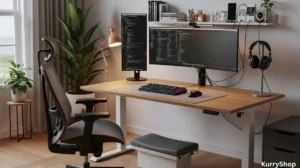
I really noticed my office setup was wrong wasn’t during a big deadline or a stressful week. It was on a random Tuesday afternoon, the kind where nothing dramatic happens. I stood up to make coffee and felt that dull pull in my lower back that had been quietly building for months. My wrists felt stiff in a way that didn’t quite hurt, but didn’t feel normal either. I remember thinking, not for the first time, that this was just part of working at a desk. You sit, you ache, you get older. That’s the deal.
But later that evening, while rearranging some cables under my desk, I realized how many things in my setup were chosen quickly, cheaply, or because they “looked fine” online. The chair came from a clearance sale. The desk was bought because it fit the room, not my body. The monitor was positioned wherever the stand allowed. None of it was terrible on its own. Together, it quietly shaped how I moved, how long I could focus, and how tired I felt by the end of the day. That’s what most office tools do. They don’t break loudly. They wear you down slowly.
Comfort isn’t softness, and that’s where people start wrong
When people talk about office comfort, they often mean softness. Cushy chairs. Thick wrist pads. Plush footrests. It sounds logical. Soft equals comfortable. But comfort, in a work setup, has more to do with support than softness. A chair that feels amazing for ten minutes can feel awful after three hours if it doesn’t guide your posture properly. The same goes for desk accessories. A squishy wrist rest can actually force your wrists into awkward angles if it’s too high or too narrow.
What you start noticing, after spending real time with better-designed tools, is that true comfort often feels almost boring. Nothing draws attention to itself. Your shoulders don’t creep upward. Your feet stay planted without effort. You don’t fidget as much because your body isn’t quietly asking for relief. That’s usually the first sign something is working.
Chairs: where durability quietly matters more than looks
Office chairs are where most people either overspend or underthink. There’s very little middle ground. Some buy a flashy gaming chair with aggressive styling and stiff padding. Others grab the cheapest adjustable chair they can find and hope for the best. What actually matters tends to be less exciting:
- A seat pan that doesn’t push into the back of your knees
- Lumbar support that moves with you, not against you
- Armrests that adjust in height and width, not just up and down
- A recline mechanism that feels smooth instead of clunky
The durability part shows up slowly. Cheap chairs often feel fine in the first few weeks. Then the foam compresses. The armrests wobble. The gas lift starts sinking just enough to be annoying. You compensate without realizing it, sitting slightly forward, bracing with your legs, leaning on the desk. Well-built chairs don’t announce their quality immediately. They keep feeling the same six months later. Two years later. That consistency is what protects your body, even if it doesn’t feel dramatic.
One thing I didn’t expect: breathable materials matter more than padding thickness. Mesh-backed chairs, when done well, stay comfortable over long sessions because they don’t trap heat. That alone can reduce restlessness, especially in warmer rooms.
Desks: the height problem nobody notices at first
Desks are deceptively simple. It’s just a flat surface, right? But desk height dictates almost everything else in your setup. Too high, and your shoulders lift without you noticing. Too low, and you collapse forward. Many standard desks are built to fit rooms, not people, which is why adjustable desks have become so popular.
But there’s a quiet truth about sit-stand desks that rarely gets mentioned: standing isn’t automatically better. It’s only better if the desk height is right and you’re not locking your knees or leaning forward. A good adjustable desk should have:
- A height range that actually matches your body (many don’t go low enough)
- A stable frame that doesn’t wobble at standing height
- Controls that are simple enough you’ll actually use them
- Enough depth to keep monitors at a comfortable distance
Durability shows up here in the motor and frame. Cheaper desks often develop subtle shakes over time, especially when loaded with monitors. It’s not dramatic, but your eyes notice, and your neck compensates. Sometimes a fixed-height desk with the right measurements and a solid build can outperform a poorly made adjustable one. That’s a detail most reviews gloss over.
Monitors and arms: small adjustments, big impact
Most people underestimate how much monitor position affects fatigue. It’s not just about screen size or resolution. It’s about where your head sits in space for hours at a time. A monitor arm is one of those tools that feels optional until you use a good one. Being able to pull the screen closer, raise it slightly, or angle it just right reduces the constant micro-movements your neck makes when something feels “almost right.” When choosing monitor arms, the checklist matters more than brand hype:
- Weight range that actually supports your monitor
- Smooth tension adjustment, not jerky springs
- A clamp or grommet that doesn’t chew up your desk
- Enough extension without drifting forward over time
Durability shows up when the arm holds its position week after week. Cheaper arms tend to sag just a little, forcing you to re-adjust. It’s a small annoyance, but it breaks focus more than you’d expect. Direct comparison helps here. A basic monitor stand lifts your screen, but it locks you into one posture. A solid arm adapts as your posture shifts throughout the day. Over time, that flexibility reduces strain more effectively than a static “perfect” position.
Keyboards and mice: comfort is about angles, not trends
Mechanical keyboards, ergonomic keyboards, split layouts, low-profile designs. The market is full of strong opinions. What matters most, though, is how your hands approach the desk. Flat, wide keyboards can force your wrists outward. High-profile keys can push your wrists into extension if the desk is too high. Vertical mice can reduce forearm twist, but only if your grip feels natural. Here’s what’s actually worth paying attention to:
- Wrist angle when typing, not how the keyboard looks
- Key travel that doesn’t require excess force
- Mouse shape that fits your hand, not your brand loyalty
- Surface texture that allows small movements without tension
Durability in input devices is subtle. Keys losing consistency. Scroll wheels skipping. Mouse buttons requiring more force over time. These changes add friction to everyday tasks, which increases mental fatigue even if you can’t articulate why. One surprising thing: lighter mice often reduce strain more than heavily contoured ones. Less weight means less effort in constant micro-movements.
Cables, lighting, and the stuff people ignore
Cable management sounds cosmetic until you live with bad lighting or tangled cords. Visual clutter increases cognitive load, even if you think you’ve tuned it out. A desk lamp with adjustable color temperature matters more than brightness alone. Cooler light in the morning helps alertness. Warmer light later reduces eye strain. Overhead lighting alone often creates glare without you realizing it. Simple tools make a real difference:
- Cable trays that mount under the desk, not on the floor
- Velcro ties instead of zip ties, so adjustments stay easy
- Monitor bias lighting to reduce contrast strain
- Footrests that adjust, not fixed foam blocks
Durability here is less about materials and more about design. Tools that allow easy changes last longer because you keep using them instead of abandoning them when your setup evolves.
Laying everything out side by side makes those differences easier to spot.
| Tool | Comfort (Day-to-Day) | Function & Usability | Durability Over Time | Common Issues |
|---|---|---|---|---|
| Office Chair | Supports posture without pressure points | Adjustable seat, arms, and lumbar | Frame and padding hold shape for years | Cheap foam, weak armrests |
| Desk (Fixed / Adjustable) | Correct height reduces shoulder tension | Enough depth for screen distance | Stable surface, no wobble | Limited height range, shaky legs |
| Monitor Arm | Reduces neck strain over long sessions | Smooth movement, easy positioning | Holds position without sagging | Weak springs, drifting screens |
| Keyboard & Mouse | Neutral wrist angles, light movement | Responsive keys and precise tracking | Consistent feel after heavy use | Key wear, stiff clicks |
| Lighting & Accessories | Reduces eye strain and fatigue | Easy adjustments, clean workspace | Materials don’t loosen or fade | Glare, fragile mounts |
Once you see it like this, a lot of common advice around office setups starts to feel incomplete.
What most people get wrong about this whole thing
The biggest misconception is thinking comfort is something you “buy” once. Office setups aren’t static. Your body changes. Your workload shifts. Your habits evolve. A setup that feels perfect now may feel off in six months, not because it’s bad, but because it’s no longer aligned with how you work.
People also overvalue aesthetics. Minimal desks look great online, but removing everything isn’t the same as removing friction. A setup that supports your workflow might look slightly messy, and that’s okay. Another common mistake is chasing extremes. Standing all day. Sitting perfectly upright. Using the most “ergonomic” product without understanding why it exists. Comfort comes from variation, not perfection. The best setups allow movement without making you think about it.
Comparing two common approaches: budget bundle vs. thoughtful upgrades
A popular route is buying a full office bundle from one brand. Chair, desk, accessories, all designed to match. It’s convenient and visually cohesive. The alternative is slower: upgrading piece by piece. Replacing the chair first. Adding a monitor arm later. Swapping the keyboard after noticing wrist discomfort.
Bundles often compromise durability to hit a price point. Individual upgrades let you prioritize what affects you most. Over time, the second approach usually costs less than replacing an entire setup that didn’t quite work. Neither is wrong. But knowing the trade-off matters.
Durability shows up when life gets busy
You don’t notice good tools when everything is calm. You notice them during long calls, tight deadlines, or days when you don’t want to think about your body at all. A durable office setup fades into the background. Adjustments stay where you put them. Materials don’t degrade into distractions. Comfort feels consistent, not impressive.
That’s the real test. And once you’ve experienced that, it’s hard to go back to a setup that quietly asks more from you than it gives back.